and I thought this was funny: They just calmly walk away…
A Basic Version Of scrypt() – Memory Hard Problems
The script below will unroll 1048576 (20-bits) x 32-bytes (32-megabytes) of SHA256 hash digests into memory and will perform 1048576 (20-bits) of array index look ups to get the final hash digest.
import hashlib
def tohex(h):
	o = ""
	for c in h:
		d = ord(c)
		f = ""
		if (d < 16):
			f = "0"
		d = hex(d)
		o += (f + d[2:])
	return o
def scrypt(p, r, m):
	h = hashlib.sha256(p).digest()
	#print(tohex(h))
	k = h
	l = []
	s = 0
	while (s < m):
		k = hashlib.sha256(k).digest()
		#print(s,tohex(k))
		l.append(k)
		s += 1
	k = h
	i = 0
	n = (m - 1)
	while (i < r):
		tt = ((ord(k[28]) << 24) | (ord(k[29]) << 16) | (ord(k[30]) << 8) | (ord(k[31]) << 0))
		j = (tt & n)
		#print(i,hex(tt),j,tohex(l[j]))
		k = l[j]
		i += 1
	return tohex(k)
s = scrypt("P@ssW0rd1!", 2**20, 2**20)
print(s)
cat /proc/cpuinfo | grep -i 'model.*name' | head -n 1 ; date ; python scrypt.py ; date
model name	: Intel(R) Core(TM) i7-3770 CPU @ 3.40GHz
Sat Jan 25 13:20:42 EST 2014
3f26b65f9c3ae151c7113efd3abe57a5e7257ba9b9010ec53acde03112b5a9b1
Sat Jan 25 13:20:44 EST 2014
# cat /proc/cpuinfo | grep -i 'model.*name' | head -n 1 ; date ; python scrypt.py ; date
model name	: Intel(R) Xeon(R) CPU E5-2650 0 @ 2.00GHz
Sun Jan 26 19:18:13 UTC 2014
3f26b65f9c3ae151c7113efd3abe57a5e7257ba9b9010ec53acde03112b5a9b1
Sun Jan 26 19:18:16 UTC 2014
sysctl -n machdep.cpu.brand_string ; date ; python scrypt.py ; date
Intel(R) Core(TM) i5-3210M CPU @ 2.50GHz
Sat 25 Jan 2014 13:16:15 EST
3f26b65f9c3ae151c7113efd3abe57a5e7257ba9b9010ec53acde03112b5a9b1
Sat 25 Jan 2014 13:16:19 EST
and also, a random py script to generate random passwords:
import os
import random
import string
import sys
f = open(sys.argv[1], "r")
for l in f.readlines():
	l = l.strip()
	p = []
	for x in range(0, int(sys.argv[2])):
		if ((x % 4) == 0):
			p.append(random.choice(string.digits))
		elif ((x % 4) == 1):
			p.append(random.choice(string.uppercase))
		elif ((x % 4) == 2):
			p.append(random.choice(string.lowercase))
		elif ((x % 4) == 3):
			p.append(random.choice("~!@#$%^&*+"))
	random.shuffle(p)
	s = "".join(p)
	print(l + "," + s)
f.close()
MSCHAPv2 Is Over Complicated & $#!T, So I Propose MSCHAPv3
Some “brilliant” “engineer” at Microsoft got paid way too much money to invent this non-sense protocol below:
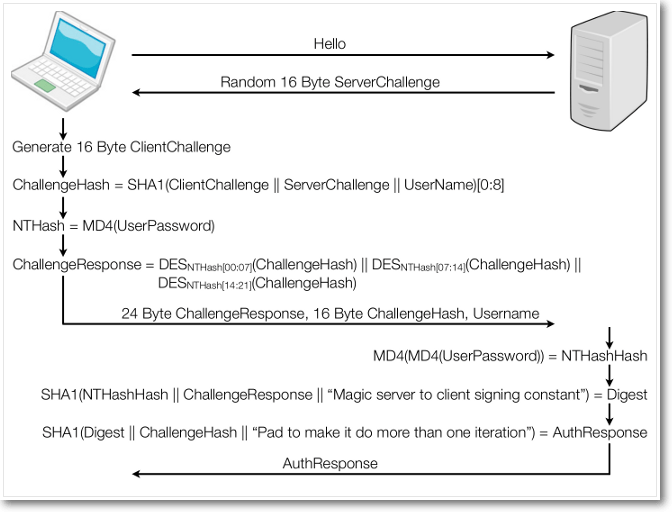
[ Video: https://www.youtube.com/watch?v=sIidzPntdCM by Moxie Marlinspike]
So here, I’ll propose a simpler version, based on better algorithms, for free! Let’s call it, I don’t know… MSCHAPv3 and here’s it’s RFC:
Client [username & password stored in brain]
Server [username & password stored in file_hash = username:pre_salt;sha256(pre_salt + password + post_salt);post_salt]
       [pre_salt = random_char(16) & post_salt = random_char(16)]

Client [client_nonce = random_byte(32)]
Client ---> client_nonce                ---> Server
                                             Server [server_nonce = random_byte(32)]
Client <--- server_nonce                 user_hash                   ---> Server
Client <--- pre_salt + ";" + post_salt   chap_hash                   ---> Server
                                             Server [chap_hash = sha256(client_nonce + file_hash + server_nonce) & auth_stat = (OK or NO)]
Client <--- auth_stat                   <--- Server
And here’s the Python/Pseudo Code:
import hashlib
import random
file_hash = "jon:!@#$;086f15ae992ccf018f8b907681a855df80836448fd1240cad48f4fd4cd591c6a;%^&*"
client_nonce = str(random.getrandbits(32*8)) ; print("--->", client_nonce)
server_nonce = str(random.getrandbits(32*8)) ; print("", user_hash,"==",user_verify)
pre_salt = file_hash.split(":")[1].split(";")[0]
post_salt = file_hash.split(":")[1].split(";")[2] ; print("", chap_hash,"==",chap_verify)
auth_stat = ((user_hash == user_verify) and (chap_hash == chap_verify)) ; print("<---", auth_stat)
And here’s the public parts of the CHAP:
('--->', '56694872300446231399629229069920062364535355653875029722468457353192460920651')
('', 'e755ddaebc858e9cf681c07f875f10af57b2d824c3b3733d89811b7471997d22', '==', 'e755ddaebc858e9cf681c07f875f10af57b2d824c3b3733d89811b7471997d22')
('', '6d1f2bf581e65227f7d8ec88f7fe85090642e66a9bd754e3ee8bc4e7c185c431', '==', '6d1f2bf581e65227f7d8ec88f7fe85090642e66a9bd754e3ee8bc4e7c185c431')
('<---', True)
The RSA Algorithm Equivalent Of The NSA’s Dual_EC_DRBG (The Danger Of Standardizing Magical Constants!)
- Let’s pretend I am the NSA
- Let’s pretend I wanted to influence or trick NIST along with the RSA (the organization, not the algorithm!) into approving:
- A new, very slow! (slow means good right?), secretly backdoored, non-obvious, non-provable, plausibly deniable PRNG standard
- Let’s also make it part of a mandatory suite so that it *must* be implemented in any software that’s requesting standards approval
- I would probably want this standard to be based on a common asymmetric encryption algorithm, say RSA, so that it appears normal and good
- First, I would calculate the following components in secret (and obviously with much larger, stronger numbers so that no one else can break our private key)
p=241 ; q=251
n = (p * q) ; n
phi = ((p - 1) * (q - 1)) ; phi
e = 239 ; n % e ; phi % e
print("http://www.wolframalpha.com/input/?i=multiplicative+inverse+of+"+str(e)+"+mod+"+str(phi)+" # obviously we must do this step in private locally but I'm too lazy to implement the math...")
d = 38159 ; (e * d) % phi
- Then I declare the following algorithm and constants to be used publicly:
Define TwoBit_RSA_PRNG (or Dual_RSA_PRNG, sound familiar? :):
Defined Constants:

    let e be the prime integer used for exponentiation
    let n be the prime integer used as the modulus
    let ^ represent the exponentiation operator
    let % represent the modulus operator
    let & represent the binary AND operator
    let + represent the addition operator

Pseudo Code:

import sys
def powmod(a, b, c):
    return ((a ^ b) % c)
def Dual_RSA_PRNG(seed, init):
    e = 239;# Magic!
    n = 60491;# Magic!
    init = (init & 0xFFF)
    return powmod((seed + init), e, n)
def main(a, b):
    s = a
    r = Dual_RSA_PRNG(s, b)
    for x in range(0, 9):
        r = Dual_RSA_PRNG(s, r)
        sys.stdout.write(str(r)+" ")
    sys.stdout.write("\n")
main(int(sys.argv[1]), int(sys.argv[2]))
- Example Output:
main(31337, 0) = 41308 34055 21755 59599 44528 47001 55179 46730 24863
- So what does the above mean?
- The output bytes above appear to be random and even acquiring them doesn’t leak the next set of bytes, assuming the seed stays secret
- One should not be able to break the private key, assuming it is large and secure enough
- Even if someone discovers the private key, they still cannot prove that we have the key, assuming we keep it secret
- With the private key, we can determine the seed and predict the future stream of random bytes with a small amount of the random output
PRNG Predicition Python Code:
import sys
def predict(out0, out1):
    e = 239;# Magic!
    n = 60491;# Magic!
    d = 38159;# Private!
    b0 = (out0 & 0xFFF) ; b0
    b1 = ((out1 ** d) % n) ; b1
    s = (b1 - b0)
    print("Discovered seed: "+str(s))
    r = out1
    sys.stdout.write("PRNG prediction: ")
    for x in range(0, 9):
        r = (((s + (r & 0xFFF)) ** e) % n)
        sys.stdout.write(str(r)+" ")
    sys.stdout.write("\n")
predict(int(sys.argv[1]), int(sys.argv[2]))
$ python break.py 59599 44528
Discovered seed: 31337
PRNG prediction: 47001 55179 46730 24863 51524 37767 31388 49000 137
- And now we can continue the original PRNG to see what “random” output would come next:
main(31337, 59599) = 47001 55179 46730 24863 51524 37767 31388 49000 137
Conclusion: And that folks is how great Dual_EC_DRBG is! We are paying these people millions in tax payer dollars to come up with these garbage algorithms practically equivalent to the one above. It’s kind of saddening to see…
2013 in review
The WordPress.com stats helper monkeys prepared a 2013 annual report for this blog.

Here’s an excerpt:
A San Francisco cable car holds 60 people. This blog was viewed about 3,500 times in 2013. If it were a cable car, it would take about 58 trips to carry that many people.
Quick Blog Links
| about | root @ |
   |
|||
 |
MacOS/iOS Applications | [x-code + objective-c] | |||
| SSHPass Automation Program | [python / app] | ||||
| DHCP/ARP Relay-Bridge ~ Proxying | [c / lan] | ||||
| ARP Sync + Route Replacement | [python / networking] | ||||
| DNS-VPN ~ UDP-SSL | [python / networking] | ||||
| OpenVPN MODs ~~ BULK ++ MTIO ++ DUAL | [c / networking] | ||||
| VPN Multi-Proc/Thread TUN-TCP Full-MTU Bulk-Data EXE | [c / networking] | ||||
| written | Secure LAN Communication | [College Thesis] | |||
| College Project – Teaching Hacking! | [Course Paper] | ||||
| ARM Assembly – A Basic Introduction… | [Blog Post] | ||||
| configs | Dual Minis | WiFi Networks | |||
| Mac Mini ++ Lenovo Mini | Firewalling [eb||nf]tables | ||||
| Cisco and OpenWRT | NFTables FlowTable | ||||
| Ubiquiti and OpenWRT | Routing ~~ Balancing | ||||
| Home Stuff | |||||
| gear | vpn @@ xorcipher.com   |
||||

|
|||||||||||||||||||||||||||||||||||||||
| |||||||||||||||||||||||||||||||||||||||
A Slight Modification Of The CPU-Based Random Number Generator
Just a little update of a previous script I posted here, it’s still very slow to run but it doesn’t rely on a hash function to create the final set of random data…
import signal
import sys

c = 0; f = 0
r = ""; t = 0; b = 0

def handler(signum, frame):
	global c, f
	global r, t, b
	f = 1
	s = str(c); m = len(s)
	if ((m % 2) == 1):
		s = s[1:]; m = len(s)
	#print(c)
	p = (m / 2)
	for x in range(0, p):
		d = ((int(s[x]) + int(s[x + p])) % 10)
		if (d > 7):
			if (int(s[x + p]) > 7):
				continue
			d = int(s[x + p])
		u = min(8 - b, 3)
		w = (3 - u)
		#print("\t(%s + %s) = (%d >> %d) <> w) <= 8):
			r += chr(t); t = 0; b = 0
		if (u < 3):
			u = (3 - u)
			w = ((2 ** u) - 1)
			#print("\t\t(%s + %s) = (%d & %d) << %d \t %d , %d" % (s[x], s[x + p], d, w, 8 - b - u, b, u))
			t += (((d & 7) & w) << (8 - b - u)); b += u

def srnd(size):
	global c, f
	global r, t, b
	r = ""; t = 0; b = 0
	signal.signal(signal.SIGALRM, handler)
	while (len(r) < size):
		signal.alarm(1)
		c = 0; f = 0
		while (f == 0):
			c += 1
		signal.alarm(0)
	o = r[0:size]
	c = 0; f = 0
	r = ""; t = 0; b = 0
	return o

def stoh(inpt):
	h = ""
	for d in inpt:
		a = hex(ord(d))
		a = a[2:]
		if (len(a) < 2):
			a = ("0" + a)
		h += a
	return h

e = stoh(srnd(32))
print(e)
$ python sigrnd.py > test.rnd
e178c23644435d209a98623f67b39bd94124c4a03bb3f8e2d871954330ffda40
2b566db93a55190affef100972cf54f42440f225fc1f0f2ebb14062485c1bd87
dd9de46a255410fe9925ac634c1c5d90b48511486700f3c9f4666d97610d7f96
1fb232f334d4a15404d97e72fa39bc0bd70831d558ee46420944ee1475dc33cf
9f8ac9c0668f5f0bf816560413eb8d465fdf86e07a1c3cd039f5c35ca65688a1
111ee2fcb3729e6886534b261a4b3d7afb0e62dc0e6c18153fc0cef15d161ff4
7ce0411de8f635d08b1b2a5f7080893f94279637c614aca13d4136bff17f9ba6
a1e7f3592a4d5c07c56c84d4f1448928b910d1051a8e4f7113b536e941ddea72
3433453f211492348e4154bd3427d079ac8f5e4d1522cdff323fe30aaa6bcda1
00f4ff6b5337690def4ec26e832a6a032cbb024ac7d9d224712422b2e4dc41fc
361cb649e81cbe5c9ad970db125cd2309f8e196140e28d4ec5f16ea1bd3551c8
7283d4e8c0a42c400fa5f5db3573df1f446a09779ddc30ffa2b84153a3ec4c7b
86ec7f80766be8d27b24c7db7b609288c7c0ac5e6345dcf6207555c605f9222d
6595417501a0df5c0339705e3c471d5bec7a880c81e1295556dd2db8c8104323
bf166eb924ad195a028dee22a36e87b487e5c83f2d9b1fa2a6ada5b35c0192c0
b5bdc471b5d7b2f0f6b08db4274e3e1ec1e2eb5b20e450bfa25b79e8e8059d19
6e0d5ba936fc630d257c25fd27c3b99c3616ce17e470066a107cf9f56d74ced7
aaa12055cc5e6629c2ef17fa398b5aaffe24ebb01cd81edde2c5b79b75b1a2ae
06c83d2d79c64d5ee206c48efe15841224a4b4279efbbca2f47dc1d8a40bc5bd
daf5cc2d164e3bae9fcc4a8e698169556e96d19e47eaae842f5fa77d0342f00d
57095f3ed4445c0331bff1b86f883fc589437dcc8b45a0900bee2cf44609da99
95c522a66f0984cb9382ff737f340a8cec5434fe573d3fb6c48f13133eea6f9f
3ef172617d41b1ca588ba7ff28e242dd6488bf5a9ba41b2a8834b9a3cf35f752
1135a16689629f2560a8c4390a908ec345d5bcd82f78210597c99ee34eb15e94
dc9d4be19a93b602cf3bdeb0baf913c5273d020f75162e30636dfb0fcb80d121
a214d021f98d2f028e780747deb7bc9a368ec36e9d226f029f89d85325d6cf02
3dfe96a7bef6c8dcff22b163d8407fee1f8d52ff39144433d72da6918ee6c853
4097d09af9abfeaecd46bf8eb49933c0e8a903719cb21a0688e4d5e544fd1e11
e1616e89980c450022236a9b9bf05dd2e03f15b5e0af17674ffca56e6138c9d3
78193776e694cac8a8c3a219b06cb70918ef29151e54828bbc4a05ad1b8598ff
1279d3a8090e0a037feebe271445e27617c0cc41165bfd8a1cfac7830d7149dc
ea3321da8408630db9dbaf945eca0e05c8dde069cf6669ed112593e7dd66573b
e0c384c87016c273a81d7001aa8977eb0d6d2447fcffae13e43c5f46a2eae4ee
c1584801c2183baf511058a8cc329f8da81455824b4a8a3f4e5c9ff891ac3466
84164902fe12ff530e7c4345fc793a695986f1edc8432a94f993c687edc31a9e
c3a195f8800150eb8c0098422fd4c31d6fdbee7bca4715ea0cde8b1b83579d47
5dc80e604deb964dfab71c8c206ac4dcf5922fb53a5824b3406c9399bbd7fcba
25bbd158ed7623fb42656d29e9b56e9a2d1a763b7a00fcca1b02d262479f5a48
20bcc8976207c0a06aba765f0aa768db58c6c1ac36f9734f57a12969f55d7297
7ab12a2982aa2974092df7ef0813c8f1827d2fabf781b4de3f8c7d42720783c1
68dc9f744bd8794919c7abcbb0a7b3737b9f0caf974e0d6a2688241aa0559cd4
731e9f253a0c8827a10639066169ac33dfc9c9a5ddb85e8def8ec151ab352469
096ac68f4d62eaac2476977a498a362b5b45e18e5dbbb0f78c5649ec94817e76
0245dd2c4ef49382546aa06c3929ba4e70f210af3bedfc4c5eebc46bd9391683
bf7110c1e15f178ab1171c5f938ab1e2d0a1b9b29677b9f362b3132ef56dabbf
1643830ba06963161eaa04b9f8e088a4687d09e438e41d2a5466d6f78b274c9e
c9def9205f496b010ce2892135fef94fe2deb7f62640dff9f30994fd5f46e4de
938d483ed34deb033207ed1ec4cadbf8c3d9e8d86f93717575b4cd17eeb725c1
f96f1a0e38c9f7a2fe6a623fb3b62a151dc9b0f51b34861b7730b4058b1ded9b
6c7e48582ded238178c1036be88b7583803ece4127781b3cded024925e4c9e6b
6810854b6219e191fff2f7623c0827045fa4f097e043277d45260aeeb512c128
3512bb2fa47c1b3808f9b1109bd5cdc1506d9f472534c89f0433ab2d286f5cdd
ab8a7ad4fea0b0391fd162dfb975dfc190dfb200a6e2f9b70959c3dc4147416e
1824ac1a6806ac85ec8618426173bf1f77004d51446dc0cae18df7bd4d9da3df
fff792348efa02f21f40af926f1cda6bc3b486623aff46d9c13a6e14309fe2dd
28005590a0639de926f891c5e805d252375dc4602b0579c1cf7e64d06d83ce7c
951757ab8747578b690e490a306e94265912e43b2302c5d7476f98c29b667e7a
a91a3aa632cb30320b6097ae58051b58be361ab1682b2ecde9d74592592d2f1f
9c528fd8ec7c03467239cca5394038c61986ffe9bb60afd4d315781d5b2a09ec
759b5d68c9a6d0b0204f38b0d65de468cd5578f5d864ceb7f41ef10fa1b62802
Edit: A Linux entropy command line tester: http://www.fourmilab.ch/random/
As you can see below, we got up to 7.90 bits of entropy per byte while generating less than 2048 bytes of random data. We also almost hit the arithmetic mean value of 127.5 by scoring a 125. This process, however, took a really long time to run, but, all that was needed was a CPU, a counter, and a alarm signal interrupt.
$ ./ent test.rnd
Entropy = 7.900037 bits per byte.

Optimum compression would reduce the size
of this 1920 byte file by 1 percent.

Chi square distribution for 1920 samples is 262.13, and randomly
would exceed this value 36.60 percent of the times.

Arithmetic mean value of data bytes is 125.3578 (127.5 = random).
Monte Carlo value for Pi is 3.187500000 (error 1.46 percent).
Serial correlation coefficient is 0.013566 (totally uncorrelated = 0.0).
Grabbing a CA Cert with tcpdump/openssl and the built in WiFi Connection Interface
Here’s the source code first:
#!/usr/bin/python
import base64
import os
import re
import subprocess
import sys
import time
def writepem(certdata):
	f = ""
	e = base64.b64encode(certdata)
	x = 0; l = len(e)
	f += ("-----BEGIN CERTIFICATE-----\n")
	while (x < l):
		f += ("%s\n" % (e[x+0:x+64]))
		x += 64
	f += ("-----END CERTIFICATE-----\n")
	return f
def brutecert(pcapdata):
	l = 900
	while (l <= 1024):
		p = writepem(pcapdata[:l])
		#sys.stderr.write(p+"\n")
		try:
			certchk = subprocess.check_output("echo '%s' | openssl verify 2>&1 | grep '^OK$'" % (p), shell=True)
		except:
			certchk = ""
		if (certchk != ""):
			break
		l += 1
	if (certchk != ""):
		sys.stdout.write(p)
		return 1
	return 0
os.system("killall -9 tcpdump > /dev/null 2>&1 ; killall -9 tcpdump > /dev/null 2>&1")
os.system("rm -fv wifi.pcap > /dev/null 2>&1 ; tcpdump -i %s -w wifi.pcap -U > /dev/null 2>&1 &" % (sys.argv[1]))
sys.stderr.write("Note: If you want to interrupt this script, press Control+Z and killall -9 python\n")
r = 0
while (1):
	try:
		tcpout = subprocess.check_output("tcpdump -xr wifi.pcap 2> /dev/null | tr '\\t' ' ' | sed -e 's/^ [ ]*0x[0-9A-Fa-f][0-9A-Fa-f]*:[ ]*//'", shell=True)
		tcplist = tcpout.split("\n")
		eapdata = ""; eapindx = 0; eapsize = -16
		for x in range(0, len(tcplist)):
			if (eapindx < (eapsize + 4)):
				h = ""
				for c in tcplist[x].strip():
					if (not c in "0123456789ABCDEFabcdef"):
						continue
					h += c
					if (len(h) == 2):
						if (eapindx >= (eapsize + 4)):
							sys.stderr.write("EAP read error [%d] >= [%d]...\n" % (eapindx + 1, eapsize))
						else:
							if (eapindx >= 4):
								eapdata += chr(int(h, 16))
						eapindx += 1; h = ""
			else:
				z = re.match("^[0-9][0-9]:[0-9][0-9]:[0-9][0-9].* EAP packet.* v2.* len ([0-9]+)$", tcplist[x].strip(), re.I)
				if (z):
					eapindx = 0; eapsize = int(str(z.group(1)))
					sys.stderr.write("Possible EAP data: line [%d] len [%d]...\n" % (x, eapsize))
		p = 0; l = len(eapdata)
		tlsdata = ""; tlsindx = 0; tlssize = -16
		while (p < l):
			i = p; m = [["\x01","\x02"],[],[],[],["\x15"],[None],[],[],[],[]]
			for j in m:
				if (i >= l):
					pass
				elif (len(j) < 1):
					i += 1
				elif (None in j):
					if ((ord(eapdata[i]) & 0x80) > 0):
						i += 1
				else:
					for k in j:
						if (eapdata[i] == k):
							i += 1
			if (i == (p + len(m))):
				tlslen = ((ord(eapdata[p+2])<<8) + (ord(eapdata[p+3])<<0))
				tlsmlen = ((ord(eapdata[p+6])<<24) + (ord(eapdata[p+7])<<16) + (ord(eapdata[p+8])<<8) + (ord(eapdata[p+9])<<0))
				sys.stderr.write("Possible TLS data: index [%d] len [%d] mlen [%d]...\n" % (p, tlslen, tlsmlen))
				p += 10
				if (tlssize < 1):
					tlsindx = 0; tlssize = tlsmlen
				for x in range(0, tlslen - 10):
					if ((tlsindx >= tlssize) or (p >= l)):
						pass
					else:
						tlsdata += eapdata[p]
						p += 1
					tlsindx += 1
				if (tlsindx >= tlssize):
					if (tlsindx > tlssize):
						sys.stderr.write("TLS read error [%d] >= [%d]...\n" % (tlsindx, tlssize))
					tlsindx = 0; tlssize = -16
				p -= 1
			p += 1
		p = 0; l = len(tlsdata)
		while (p < l):
			if (r == 0):
				i = p; m = "\x30\x82\x03"
				for j in m:
					if (tlsdata[i] == j):
						i += 1
				if (i == (p + len(m))):
					sys.stderr.write("Possible CA data: index [%d]...\n" % (p))
					r = brutecert(tlsdata[p:])
			p += 1
	except:
		pass
	if (r != 0):
		break
	time.sleep(1)
os.system("killall -9 tcpdump > /dev/null 2>&1 ; killall -9 tcpdump > /dev/null 2>&1")
Then you run the command:
# python cagrab.py wlan0 | tee ca.crt
Note: If you want to interrupt this script, press Control+Z and killall -9 python
Possible EAP data: line [0] len [5]...
Possible EAP data: line [4] len [6]...
Possible EAP data: line [22] len [1024]...
Possible EAP data: line [90] len [1024]...
Possible EAP data: line [158] len [480]...
Possible EAP data: line [204] len [69]...
Possible EAP data: line [219] len [4]...
Possible TLS data: index [11] len [1024] mlen [2498]...
Possible TLS data: index [1035] len [1024] mlen [2498]...
Possible TLS data: index [2059] len [480] mlen [2498]...
Possible TLS data: index [2539] len [69] mlen [59]...
Possible CA data: index [74]...
Possible CA data: index [1006]...
-----BEGIN CERTIFICATE-----
MIIDtTCCAp2gAwIBAgIJAKhl2tXce/J4MA0GCSqGSIb3DQEBBQUAMHExCzAJBgNV
BAYTAkNBMRAwDgYDVQQIDAdPbnRhcmlvMRAwDgYDVQQHDAdUb3JvbnRvMQ8wDQYD
VQQKDAZzdG9vcHMxEjAQBgNVBAMMCXJhZHNydi1jYTEZMBcGCSqGSIb3DQEJARYK
cm9vdEBsb2NhbDAeFw0xNDAzMjYwMTQ1MjJaFw0yNDAzMjMwMTQ1MjJaMHExCzAJ
BgNVBAYTAkNBMRAwDgYDVQQIDAdPbnRhcmlvMRAwDgYDVQQHDAdUb3JvbnRvMQ8w
DQYDVQQKDAZzdG9vcHMxEjAQBgNVBAMMCXJhZHNydi1jYTEZMBcGCSqGSIb3DQEJ
ARYKcm9vdEBsb2NhbDCCASIwDQYJKoZIhvcNAQEBBQADggEPADCCAQoCggEBAMh2
sAnJApatDY+2IjWUmdvMuBmNBXP29FAKUfO6D6EY90MBVPShzaOsr/p4Il7oUDqy
rs3wdeCBRLvGV+cHsgyMBlHh2jS6PKHMvVEh3n2kaTb+BAXe6Q2dDdkpGz5BSr31
mYfGuDvBtDop7fE/HQH6NwMM7qHKv8yO433JPPN3E6l7ln1WXRberFkGS39CTA0j
dpAzjz2+J8Wfm2zGd/z22ggf1PGw2VukbC+o0TOQpKb05sprLQmqDykMmzv3V5N2
Sa9KUFtQNihGOjHgjRwmys5gniV52cJnAU0hSickMBiWDXp65MEXBaPCqaaqj3DM
eHkRArBOcCMnfL7KwWMCAwEAAaNQME4wHQYDVR0OBBYEFO3bA+BXWeWip7bIjvXq
vzi3AvshMB8GA1UdIwQYMBaAFO3bA+BXWeWip7bIjvXqvzi3AvshMAwGA1UdEwQF
MAMBAf8wDQYJKoZIhvcNAQEFBQADggEBAJlRk1MPGGONHKmU8WnryvnrhFr+KPfO
5eBzn+7HOSjK27FEmCRoYM3gk6SJJbIX0BtLgtz6o/E+WX7A611Jf5jXbNNOOz1L
d8F9NxmcbA3nYXaeTm2/BBOIF4diizQjHIkNS8R+MMOchKMV6WpAb7Ia7W849IbM
pQ1I5RxoTMjMy6hdpr1YUYqbTeq6X8z2P9AxiH0cKHxshQVkXFan8JTp290l2IIX
tCzIzOCqPWBcScrrhCYTbJl+9YZ1CSRwdos5/XWpCvCHI9cRA9qPLjkoiaZ8ZCHY
pxnYlLauxJnCmyk2HW00V5bUJ1vIb1mDV78Y/1kekSwZAvhOW9M1Pag=
-----END CERTIFICATE-----
Then you attempt a real connection to the WPA Enterprise access point (with fake credentials!) and wait for the script above to write out the CA Certificate file (verify it against a hash first!). You can then move this file to a user’s directory and point to it with a Wi-Fi connection client. This helps because the built-in Wi-Fi clients on Linux don’t seem to present any server certificate when connecting initially which forces one to manually transfer it around everywhere which is annoying when you have no network connection to begin with!
Finally Able To Run My Own WPA2-AES EAP-TTLS FreeRADIUS Server (RasPi)
I should have posted these pre-steps: First download the latest stable freeradius source code, extract and change directory, ./configure && make, su and make install. Also, the post-config to run the service itself: /usr/local/sbin/radiusd
And here are my example configuration notes in case anyone else is interested:
cd /usr/local/etc/raddb/certs

export D=`pwd` ; export KEY_CONFIG=$D/openssl.cnf
cat /etc/ssl/openssl.cnf | tr '\t' ' ' | sed -e "s@^dir .*\$@dir = `pwd`@g" -e "s@^countryName_default .*\$@countryName_default = CA@g" -e "s@^stateOrProvinceName_default .*\$@stateOrProvinceName_default = Ontario@g" -e "s@^0.organizationName_default .*\$@0.organizationName_default = stoops@g" > openssl.cnf

sed -i -e 's@demoCA@@g' -e 's@/newcerts@@g' /usr/lib/ssl/openssl.cnf

rm -fv index.txt ; touch index.txt
rm -fv serial ; echo 01 > serial
mkdir -p ./newcerts

openssl dhparam -out dh 2048
openssl req -days 3650 -nodes -new -x509 -keyout ca.key -out ca.crt -config $KEY_CONFIG
openssl req -days 3650 -nodes -new -keyout server.key -out server.csr -config $KEY_CONFIG
openssl ca -extensions v3_ca -days 3650 -out server.crt -in server.csr -cert ca.crt -keyfile ca.key -config $KEY_CONFIG

cat ca.crt ca.key > ca.pem
cat server.crt server.key > server.pem


#cd /etc/freeradius/certs

#openssl genrsa -out server.key 2048
#openssl req -new -key server.key -out server.csr
#openssl x509 -req -days 3650 -in server.csr -signkey server.key -out server.crt
#openssl dhparam -outform PEM -out dh 2048

#cat server.crt server.key > server.pem ; cat server.pem > ca.pem
#echo > ../acct_users
#( echo 'client 0.0.0.0/0 {' ; echo '  secret = "pwd"' ; echo '  shortname = "wifi"' ; echo '}' ) > ../clients.conf
#echo 'jon Cleartext-Password := "pwd"' > ../users
vim /usr/local/etc/raddb/eap.conf
vim /usr/local/etc/raddb/modules/inner-eap

eap {
    ...
    default_eap_type = ttls
    ...
    tls {
        ...
        private_key_file = ${certdir}/server.pem
        certificate_file = ${certdir}/server.pem
        CA_file = ${cadir}/ca.pem
        dh_file = ${certdir}/dh
        cipher_list = "DHE-RSA-AES256-SHA256:DHE-RSA-AES256-SHA"
        ...
    }
    ...
    ttls {
        ...
        default_eap_type = mschapv2
        ...
    }
    ...
    mschapv2 {
        ...
    }
    ...
}
vim /usr/local/etc/raddb/clients.conf

client 0.0.0.0/0 {
    secret    = [long-secret-passphrase-here]
    shortname = homewifi
    nastype   = other
}
Authentication:
vim /usr/local/etc/raddb/users

"jon" Cleartext-Password := "[personal-password-here]"
or
vim /usr/local/etc/raddb/sites-{available,enabled}/{default,inner-tunnel}

authorize {
    ...
    unix
    ...
}
* Note: Make sure to publish/distribute the ca.crt file above for connecting clients to use, it should look something like this:
-----BEGIN CERTIFICATE-----
MIIDzTCCArWgAwIBAgIJAMML9s5w/d4oMA0GCSqGSIb3DQEBBQUAMH0xCzAJBgNV
BAYTAkNBMRAwDgYDVQQIDAdPbnRhcmlvMRAwDgYDVQQHDAdUb3JvbnRvMQ8wDQYD
VQQKDAZzdG9vcHMxDTALBgNVBAsMBHdpZmkxDzANBgNVBAMMBnJhZHNydjEZMBcG
CSqGSIb3DQEJARYKcm9vdEBsb2NhbDAeFw0xMzEyMzAyMjE0MzBaFw0yMzEyMjgy
MjE0MzBaMH0xCzAJBgNVBAYTAkNBMRAwDgYDVQQIDAdPbnRhcmlvMRAwDgYDVQQH
DAdUb3JvbnRvMQ8wDQYDVQQKDAZzdG9vcHMxDTALBgNVBAsMBHdpZmkxDzANBgNV
BAMMBnJhZHNydjEZMBcGCSqGSIb3DQEJARYKcm9vdEBsb2NhbDCCASIwDQYJKoZI
hvcNAQEBBQADggEPADCCAQoCggEBAMsYNqwP+Zd9szkwwEVjxgOPn+d7kIZKbKnh
ZJOhG2poxnlPcv2Ac67xPuJ4tuiU6Xni1+YElkx4uxNa4GNm9EF2M0MRAE/eAwxK
QN9Y4/KN3C3AU8VDyIUXMx+XN38HI48lgZIj1c9HhoB8llTHeL4jGRVDmzqGqOCl
GwSNMh9mCgedTODARyDyJ9tyEayU1D+WDqwQTFbBfvd7VYejCtzo7edjCoMt6Kap
HsB3eE1LRTcE/QWlaDmszBzdFk+jqp2rzP+eKLXNLvalZEPOJ0koGqy9BfI9+fqW
avy/fphcN5+5UhNXadRrYOYJuPBe/AC90NmlFn+ztYmiRwf+GtkCAwEAAaNQME4w
HQYDVR0OBBYEFPE09eFbbSvz8E4uY2F4cA0PJmreMB8GA1UdIwQYMBaAFPE09eFb
bSvz8E4uY2F4cA0PJmreMAwGA1UdEwQFMAMBAf8wDQYJKoZIhvcNAQEFBQADggEB
AFYN7lTdZjNhHohCul9HzP87vHFiiV0N47eCBeyoujvkKkQHm2fKunxKLfe0ySBa
xOXdHHEhfBiv7Qz1LgryaYjMeJ8OhbktPT3ahGIWnNgyeKJiM3eD0fNVFWxp0ZBO
OlVQh5NYbuHhWafnAP8DDyhgKB99uEpF5iS1KwfkCGBbynYOayqNZGIVIH0c0Bmb
Ps+qNYxLKHQRi3+dnv4/gKPwKFDDiccHrQxiAEMXY+iO0rnPjc35SPri2QMAKdYf
1Nv/lmEPwQutjns1EUHHSmNwuC4O/1AUR54iskxzHy3v3RafOQ9B5aO6fyaMVFQF
iYX2djQzSq9qfOj9lMz5Cww=
-----END CERTIFICATE-----
Note: You can run this command to decode the certificate above: openssl x509 -in ca.crt -text -noout
Edit: For some basic OpenSSH cipher choices: Ignore the randomness
A Python TrueRand-Like Script Based On Signals, Alarms, Clocks, Counters, & SHA256
So I was watching some new Defcon videos from some of my favourite speakers (Jeff Moss, Bruce Schneier, Renderman, Dan Kaminsky, Moxie Marlinspike, Joshua Wright, Johnny Long, Charlie Miller, etc.) and Dan mentioned the ability to generate random numbers on a given system with nothing more than a CPU clock type device. I don’t understand it much but I think the basics includes setting an alarm trap signal and setting an infinite loop to increase a counter variable and then using that resulting integer as a source of randomness. You can repeat this process multiple times in a row to generate a larger amount of random data. Here’s my take on it, however, it is *very* slow and most likely mathematically/statistically wrong:
import hashlib
import signal

c = 0; f = 0
r = ""; l = 0
n = 3

def handler(signum, frame):
	global c, f
	global r, l
	global n
	f = 1
	s = str(c); m = len(s)
	if ((m % 2) == 1):
		s = s[1:]; m = len(s)
	#print(c)
	p = (m / 2)
	for x in range(0, p):
		d = ((int(s[x]) + int(s[x + p])) % 10)
		if (d > 7):
			if (int(s[x + p]) > 7):
				continue
			d = int(s[x + p])
		r += str(d); l += n

def srnd(size):
	global c, f
	global r, l
	global n
	signal.signal(signal.SIGALRM, handler)
	o = ""; m = 0
	while (m < size):
		r = ""; l = 0
		while (l < 256):
			signal.alarm(1)
			c = 0; f = 0
			while (f == 0):
				c += 1
			signal.alarm(0)
		print(r)
		h = hashlib.sha256(r).digest()
		for d in h:
			if (m < size):
				o += d; m += 1
	return o

def stoh(inpt):
	h = ""
	for d in inpt:
		a = hex(ord(d))
		a = a[2:]
		if (len(a) < 2):
			a = ("0" + a)
		h += a
	return h

e = stoh(srnd(32))
print(e)
$ python sigrnd.py
003052717203640343422444177105135642455155135417632775634425154765734347724627720521226
c2638300e80d2fb7ab0230c4a6534191dda4b86b997508ff445adc577a7426c3
A small whois server and a nice holiday video
So here’s the most basic whois server in Python (connects to a PostgreSQL DB for the cached data):
Also, a funny holiday reminder that the NSA is spying on all of us!
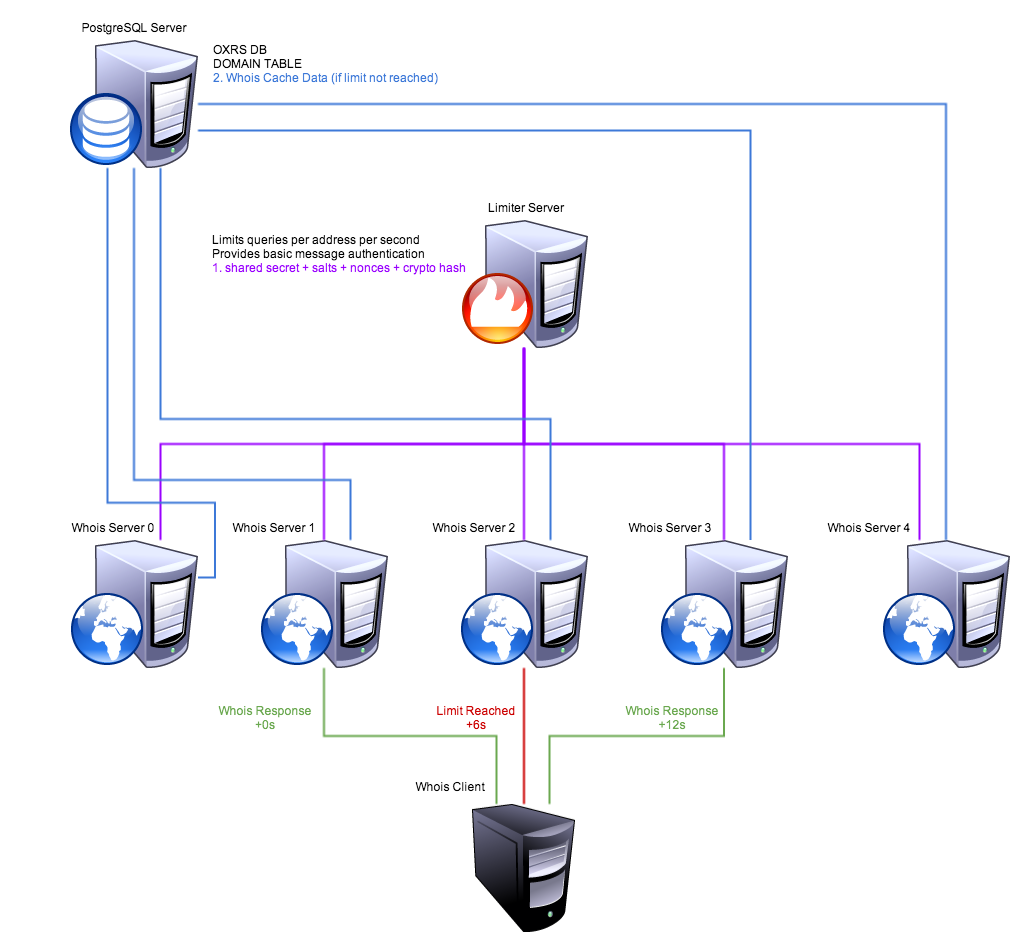
limiter.py
#!/usr/bin/python

import ast
import getpass
import hashlib
import os
import random
import re
import socket
import string
import sys
import time

def rstr(size):
	outp = ""
	for x in range(0, size):
		outp += random.choice(string.digits + string.ascii_uppercase + string.ascii_lowercase + "~!@#$%^&*-_=+?")
	return outp

fobj = open(sys.argv[1], "r")
conf = ast.literal_eval(fobj.read().strip())
fobj.close()

servport = conf["limiter"]["port"]
password = conf["limiter"]["pass"]
numtimes = conf["limiter"]["conn"]
timeouts = conf["limiter"]["time"]

prepad = rstr(8); pospad = rstr(8); cntrlist = []
addrlist = {}

sockobjc = socket.socket(socket.AF_INET, socket.SOCK_STREAM)
sockobjc.setsockopt(socket.SOL_SOCKET, socket.SO_REUSEADDR, 1)
sockobjc.bind(("", servport))
sockobjc.listen(1)

while (1):
	(sockconn, sockaddr) = sockobjc.accept()
	print("conn open:", sockaddr)
	try:
		sockconn.settimeout(1)
		datalist = sockconn.recv(1024).strip().split(" ")
		try:
			sendflag = 0
			scounter = datalist[0].strip()
			inetaddr = datalist[1].strip()
			authhash = datalist.pop()
			sharedsec = (prepad + " " + password + " " + pospad)
			temphash = hashlib.sha256(sharedsec + " " + " ".join(datalist) + " " + sharedsec).hexdigest()
			if (temphash != authhash):
				sockconn.send("0" + " " + prepad + " " + pospad)
				sendflag = 1
			else:
				if (len(cntrlist) >= 65536):
					prepad = rstr(8); pospad = rstr(8); cntrlist = []
				if (scounter in cntrlist):
					sockconn.send("1" + " " + scounter)
					sendflag = 1
				else:
					cntrlist.append(scounter)
					if (not inetaddr in addrlist.keys()):
						addrlist[inetaddr] = [0, 0]
					prestime = time.time()
					if ((prestime - addrlist[inetaddr][0]) >= timeouts):
						addrlist[inetaddr][0] = prestime
						addrlist[inetaddr][1] = 0
					print("conn info:", sockaddr, scounter, datalist, addrlist[inetaddr])
					if (addrlist[inetaddr][1] < numtimes):
						addrlist[inetaddr][1] += 1
						sockconn.send("2" + " " + "ok")
						sendflag = 1
			if (sendflag != 1):
				sockconn.send("2" + " " + "no")
		except:
			pass
	except:
		pass
	try:
		print("conn closed:", sockaddr)
		sockconn.shutdown(socket.SHUT_RDWR)
		sockconn.close()
	except:
		pass
whoiss.py
#!/usr/bin/python

import ast
import getpass
import hashlib
import os
import psycopg2
import random
import re
import socket
import string
import sys
import time

def sstr(inpt):
	outp = ""
	yesl = (string.digits + string.ascii_uppercase + string.ascii_lowercase + "-_.")
	for chrl in inpt:
		if (chrl in yesl):
			outp += chrl
	return outp

def rnum(size):
	random.seed(time.time())
	outp = ""
	for x in range(0, size):
		outp += random.choice(string.digits)
	return outp

def lims(connaddr):
	global limhost, limport
	global limpass, limpre, limpos
	x = 0
	limresp = ["-1"]
	try:
		while ((x < 8) and (limresp[0] != "2")):
			limnumb = rnum(8)
			limobjc = socket.socket(socket.AF_INET, socket.SOCK_STREAM)
			limobjc.connect((limhost, limport))
			limdata = (limnumb + " " + connaddr)
			limsec = (limpre + " " + limpass + " " + limpos)
			limhash = hashlib.sha256(limsec + " " + limdata + " " + limsec).hexdigest()
			limobjc.sendall(limdata + " " + limhash)
			limresp = limobjc.recv(1024).strip().split(" ")
			limobjc.close()
			if (len(limresp) < 1):
				limresp = ["-1"]
			if (limresp[0] == "0"):
				limpre = limresp[1]
				limpos = limresp[2]
			elif (limresp[0] == "1"):
				pass
			print("recv limit:", limdata, limresp)
			x += 1
	except:
		pass
	return limresp

'''{
"db":{"host":"127.0.0.1", "user":"whois", "pass":"Siohw1!", "name":"dbname", "table":"whois_cache", "col":"text"},
"limiter":{"host":"127.0.0.1", "port":3434, "pass":"Limiter1!", "conn":1, "time":10},
"whois":{"port":4343},
}'''
fobj = open(sys.argv[1], "r")
conf = ast.literal_eval(fobj.read().strip())
fobj.close()

servport = conf["whois"]["port"]
childlist = []

limhost = conf["limiter"]["host"]
limport = conf["limiter"]["port"]
limpass = conf["limiter"]["pass"]
limpre = ""; limpos = ""

sqlshost = conf["db"]["host"]
sqlsuser = conf["db"]["user"]
sqlspass = conf["db"]["pass"]
sqlsdb = conf["db"]["name"]
sqlstbl = conf["db"]["table"]
sqlscol = conf["db"]["col"]

sockobjc = socket.socket(socket.AF_INET, socket.SOCK_STREAM)
sockobjc.setsockopt(socket.SOL_SOCKET, socket.SO_REUSEADDR, 1)
sockobjc.bind(("", servport))
sockobjc.listen(1)

while (1):
	for x in range(0, len(childlist)):
		try:
			os.waitpid(childlist[x], os.WNOHANG)
		except:
			childlist[x] = -1
	while (-1 in childlist):
		childlist.remove(-1)
	lims("127.0.0.1")
	(sockconn, sockaddr) = sockobjc.accept()
	print("conn open:", sockaddr)
	try:
		childpid = os.fork()
	except:
		childpid = -1
	if (childpid == 0):
		resplim = lims(sockaddr[0])
		try:
			sqldom = sockconn.recv(1024).strip()
			sqldom = sstr(sqldom.upper())
			connresp = ""
			print("conn data:", sockaddr, sqldom)
			if ((resplim[0] == "2") and (resplim[1] == "ok")):
				try:
					conn = psycopg2.connect("host='%s' dbname='%s' user='%s' password='%s'" % (sqlshost, sqlsdb, sqlsuser, sqlspass))
					curs = conn.cursor()
					curs.execute("SELECT %s FROM %s WHERE name = '%s';" % (sqlscol, sqlstbl, sqldom))
					rows = curs.fetchall()
					conn.close()
					leng = 0
					for rowo in rows:
						connresp = ("%s\n\n\n" % (rowo[0].strip()))
						leng += 1
						break
					if (leng < 1):
						connresp = ("NOT FOUND\n")
				except:
					connresp = ("SERVER ERROR (1)\n")
			else:
				connresp = ("LIMIT REACHED\n")
			sockconn.send(connresp)
		except:
			pass
		try:
			print("conn closed:", sockaddr)
			sockconn.shutdown(socket.SHUT_RDWR)
			sockconn.close()
		except:
			pass
		sys.exit(0)
	else:
		try:
			sockconn.close()
		except:
			pass
		childlist.append(childpid)
Limiter Notes:
- The shared secret is padded with 2 random strings:
- shared-secret = (pre-pad + common-password + post-pad)
- These 2 strings are re-generated after 2^16 unique nonces are used
- The message data is prefixed with a unique nonce string:
- message-data = (uniq-nonce + message-body)
- The limiter server uses sha256 hashing to authenticate data:
- auth-message = sha256(shared-secret + message-data + shared-secret)
- Can switch to a basic HMAC call if greater security is needed
- The limiter server is a single process which communicates with any connecting clients
- Can switch to a forked-child setup if faster connections are needed
Whois Notes:
- The whois server uses forked-child processes to communicate with multiple clients at the same time
- Each client process will make its own connection to the database server
A Simple Puppet Master/Node/Agent Starter Guide
If you’re looking for a simple, quick starter guide to setting up a basic Puppet master/agent between VM’s then you should take a look at this blog I came across from a Google search. I’m putting this here as a bookmark to myself:
http://www.6tech.org/2013/01/how-to-install-puppet-open-source-on-centos-6-3/
Edit:
Pushing an example shell script to some agents (puppetnode):
[master ~]# cat /etc/puppet/manifests/site.pp
node "puppetnode"
{
	file { "/usr/local/bin/repoconf.sh" :
		mode => 0755,
		owner => root,
		group => root,
		source => "puppet:///modules/bin/repoconf.sh"
	}
	exec { "/usr/local/bin/repoconf.sh" :
		require => File["/usr/local/bin/repoconf.sh"]
	}
	package { "nc" :
		ensure => latest,
		require => Exec["/usr/local/bin/repoconf.sh"]
	}
}
[master ~]# cat /etc/puppet/modules/bin/files/repoconf.sh
#!/bin/bash
echo `date` >> /tmp/custom.puppet.sh.log
[puppetnode ~]# puppet agent -t
Info: Retrieving plugin
Info: Caching catalog for puppetnode
Info: Applying configuration version '1386822999'
Notice: /Stage[main]/Main/Node[puppetnode]/File[/usr/local/bin/repoconf.sh]/ensure: defined content as '{md5}dfd896a6b7b57885fac7bac43f2bd263'
Notice: /Stage[main]/Main/Node[puppetnode]/Exec[/usr/local/bin/repoconf.sh]/returns: executed successfully
Notice: /Stage[main]/Main/Node[puppetnode]/Package[nc]/ensure: created
Notice: Finished catalog run in 6.84 seconds
Git Diff Between Your Current Repo & The Last Commit/Push
I’m not sure how this command works but:
git diff HEAD^ HEAD
If anyone knows how to show the same thing before you’re forced to do a “git pull”, I would like to know that as well!
Converting CSV Data To Wiki Tables Via Python
#!/usr/bin/python
import sys
x = 0; l = 1
print('{| border="1" class="wikitable"')
for line in sys.stdin.readlines():
	type = "|"
	if (x == 0):
		type = "!"
	if (x != 0):
		print('|-')
	if ("," in line):
		l = 0
		for coli in line.split(","):
			print(type + ' style="white-space:nowrap;" | ' + coli.strip())
			l += 1
	else:
		print('| colspan="'+str(l)+'" align="middle" | ' + line)
	x += 1
print('|}')
POC – An Encrypted File Upload/Download Site In PHP
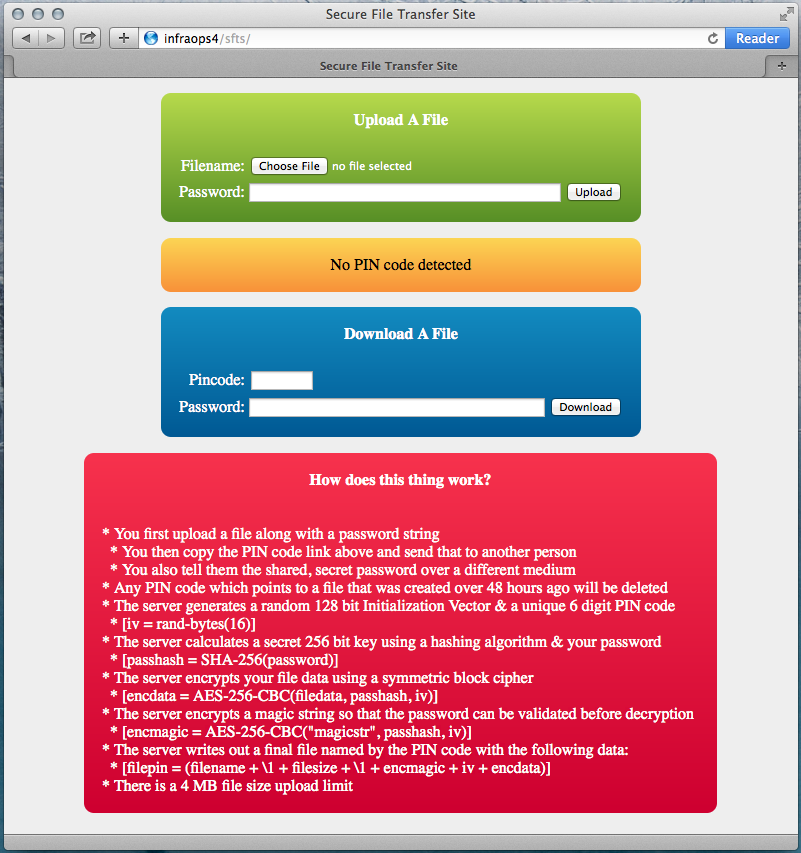
There is no site currently running this script but I have posted the code on github just in case anyone would like to play with it or run it. [GIT Repo]

<?php
# sudo su -
# mkdir -p /var/www/uploads/$sub
# for d in /var /var/www /var/www/uploads ; do chown root:root $d ; chmod 755 $d ; done
# chown root:apache /var/www/uploads/$sub
# chmod 770 /var/www/uploads/$sub
function safe_valu($vkeyname)
{
if (isset($_GET[$vkeyname])) { return $_GET[$vkeyname]; }
if (isset($_POST[$vkeyname])) { return $_POST[$vkeyname]; }
return "";
}
function rand_numb()
{
$o = "";
for ($x = 0; $x < 6; $x += 1) { $o .= rand(0, 9); }
return $o;
}
function remo_file($pathname)
{
if (!is_file($pathname)) { return 0; }
$fmodtime = filectime($pathname);
$lastfmod = intval((time() - $fmodtime) / (60 * 60));
if ($lastfmod >= 48) { unlink($pathname); return 1; }
return 0;
}
date_default_timezone_set("America/Toronto");
srand(microtime() * 1000000);
$WEB_EOL = "<br/>";
$writedir = "/var/www/uploads/jon";
$scptmode = safe_valu("mode");
$pinncode = preg_replace("/[^0-9]/i", "", safe_valu("pinc"));
$password = safe_valu("pass");
$aeskhash = hash("SHA256", $password, true);
if ($scptmode == "e")
{
$aesinitv = openssl_random_pseudo_bytes(16);
if (($_FILES["file"]["error"] < 1) && ($_FILES["file"]["size"] < 4096000))
{
while (1)
{
$pinncode = rand_numb();
$filename = ($writedir."/".$pinncode);
if (!file_exists($filename)) { break; }
if (remo_file($filename) == 1) { break; }
}
$fsrcobjc = fopen($_FILES["file"]["tmp_name"], "rb");
$fdstobjc = fopen($filename, "wb");
if (($fsrcobjc !== false) && ($fdstobjc !== false))
{
fwrite($fdstobjc, "".$_FILES["file"]["name"].""); # filename as string (unknown length)
fwrite($fdstobjc, "\1"); # non-printable separator (1 byte)
fwrite($fdstobjc, "".$_FILES["file"]["size"].""); # filesize in bytes (unknown length)
fwrite($fdstobjc, "\1"); # non-printable separator (1 byte)
$emessage = mcrypt_encrypt(MCRYPT_RIJNDAEL_128, $aeskhash, "magicstring", MCRYPT_MODE_CBC, $aesinitv);
fwrite($fdstobjc, $emessage); # encrypted magic string (16 bytes)
fwrite($fdstobjc, $aesinitv); # initialization vector (16 bytes)
while (!feof($fsrcobjc))
{
$fsrcdata = fread($fsrcobjc, 16);
$emessage = mcrypt_encrypt(MCRYPT_RIJNDAEL_128, $aeskhash, $fsrcdata, MCRYPT_MODE_CBC, $aesinitv);
fwrite($fdstobjc, $emessage);
$aesinitv = $emessage;
}
fclose($fdstobjc);
fclose($fsrcobjc);
chmod($filename, 0770);
}
}
}
if ($scptmode == "d")
{
$filelist = scandir($writedir);
foreach ($filelist as $fileitem)
{
$itemname = ($writedir."/".$fileitem);
if (remo_file($itemname) == 1) { continue; }
if ($fileitem != $pinncode) { continue; }
$fsrcobjc = fopen($itemname, "rb");
if ($fsrcobjc !== false)
{
$filename = ""; $filechar = "";
while ($filechar != "\1") { $filename .= $filechar; $filechar = fread($fsrcobjc, 1); }
$filesize = ""; $filechar = "";
while ($filechar != "\1") { $filesize .= $filechar; $filechar = fread($fsrcobjc, 1); }
$filesize = intval($filesize);
$magicode = fread($fsrcobjc, 16);
$aesinitv = fread($fsrcobjc, 16);
$dmessage = mcrypt_decrypt(MCRYPT_RIJNDAEL_128, $aeskhash, $magicode, MCRYPT_MODE_CBC, $aesinitv);
if (rtrim($dmessage) == "magicstring")
{
header('Content-Type: application/octet-stream');
header('Content-Disposition: attachment; filename="'.$filename.'"');
header('Content-Length: '.$filesize);
$tempinit = $aesinitv;
while ($filesize > 0)
{
$aesinitv = $tempinit;
$fsrcdata = fread($fsrcobjc, 16);
$tempinit = $fsrcdata;
$dmessage = mcrypt_decrypt(MCRYPT_RIJNDAEL_128, $aeskhash, $fsrcdata, MCRYPT_MODE_CBC, $aesinitv);
$templeng = 16; if ($filesize < 16) { $templeng = $filesize; }
print(substr($dmessage, 0, $templeng));
$filesize -= 16;
}
fclose($fsrcobjc);
exit(0);
}
fclose($fsrcobjc);
}
}
}
?>
<html>
<head>
<title>Secure File Transfer Site</title>
<style>
body
{
background: #EEEEEE;
}
a
{
color: #000000;
border-bottom: 1px dotted;
text-decoration: none;
}
.minwide
{
width: 480px;
}
.blue
{
background: linear-gradient(#2E88C4, #075698) repeat scroll 0 0 rgba(0, 0, 0, 0);
}
.green
{
background: linear-gradient(#B8DB29, #5A8F00) repeat scroll 0 0 rgba(0, 0, 0, 0);
}
.red
{
background: linear-gradient(#F04349, #C81E2B) repeat scroll 0 0 rgba(0, 0, 0, 0);
}
.bubble
{
border-radius: 10px;
color: #FFFFFF;
margin: 15px;
padding: 15px;
}
.info
{
background: linear-gradient(#F9D835, #F3961C) repeat scroll 0 0 rgba(0, 0, 0, 0);
border-radius: 10px;
color: #000000;
margin: 15px;
padding: 15px;
}
</style>
</head>
<body>
<center>
<form method="post" action="index.php" enctype="multipart/form-data">
<input type="hidden" name="mode" value="e" />
<table class="minwide bubble green">
<tr>
<td colspan="3">
<center><b>Upload A File</b></center>
</td>
</tr>
<tr>
<td colspan="3">
</td>
</tr>
<tr>
<td align="right" style="width:1%;">
<label for="file">Filename:</label>
</td>
<td align="left">
<input type="file" name="file" />
</td>
<td align="left" style="width:1%;">
</td>
</tr>
<tr>
<td align="right" style="width:1%;">
<label for="pass">Password:</label>
</td>
<td align="left">
<input type="text" name="pass" style="width:100%;" />
</td>
<td align="left" style="width:1%;">
<input type="submit" name="submit" value="Upload" />
</td>
</tr>
</table>
</form>
<table class="minwide info">
<tr>
<td>
<center>
<?php
if ($pinncode != "") { print("<a href='?pinc=".$pinncode."'>"."Your PIN code is: ".$pinncode."</a>".PHP_EOL); }
else { print("No PIN code detected".PHP_EOL); }
?>
</center>
</td>
</tr>
</table>
<form method="post" action="index.php">
<input type="hidden" name="mode" value="d" />
<table class="minwide bubble blue">
<tr>
<td colspan="3">
<center><b>Download A File</b></center>
</td>
</tr>
<tr>
<td colspan="3">
</td>
</tr>
<tr>
<td align="right" style="width:1%;">
<label for="pinc">Pincode:</label>
</td>
<td align="left">
<input type="text" name="pinc" size="8" value="<?php print($pinncode); ?>" />
</td>
<td align="left" style="width:1%;">
</td>
</tr>
<tr>
<td align="right" style="width:1%;">
<label for="pass">Password:</label>
</td>
<td align="left">
<input type="password" name="pass" style="width:100%;" />
</td>
<td align="left" style="width:1%;">
<input type="submit" name="submit" value="Download" />
</td>
</tr>
</table>
</form>
<table class="bubble red">
<tr>
<td>
<center><b>How does this thing work?</b></center> <br /> <br />
* You first upload a file along with a password string <br />
* You then copy the PIN code link above and send that to another person <br />
* You also tell them the shared, secret password over a different medium <br />
* Any PIN code which points to a file that was created over 48 hours ago will be deleted <br />
* The server generates a random 128 bit Initialization Vector & a unique 6 digit PIN code <br />
* [iv = rand-bytes(16)] <br />
* The server calculates a secret 256 bit key using a hashing algorithm & your password <br />
* [passhash = SHA-256(password)] <br />
* The server encrypts your file data using a symmetric block cipher <br />
* [encdata = AES-256-CBC(filedata, passhash, iv)] <br />
* The server encrypts a magic string so that the password can be validated before decryption <br />
* [encmagic = AES-256-CBC("magicstr", passhash, iv)] <br />
* The server writes out a final file named by the PIN code with the following data: <br />
* [filepin = (filename + \1 + filesize + \1 + encmagic + iv + encdata)] <br />
* There is a 4 MB file size upload limit
</td>
</tr>
</table>
</center>
</body>
</html>

